도움이 되었나요?

아니오

이 문서가 도움이 되었습니까?

이유를 선택하십시오
피드백 항목에는 255자 제한이 있습니다.  / 255

피드백 감사합니다

08/20/26

Accessing the Call of Duty: Modern Warfare 4 Beta

A guide to getting into the Call of Duty: Modern Warfare 4 Beta

Important! When redeeming a code on the Call of Duty redemption page, make sure the region you select matches the region on your platform account where you will play the game. Selecting a region that does not match your platform account location may result in receiving a code you cannot redeem on your platform.

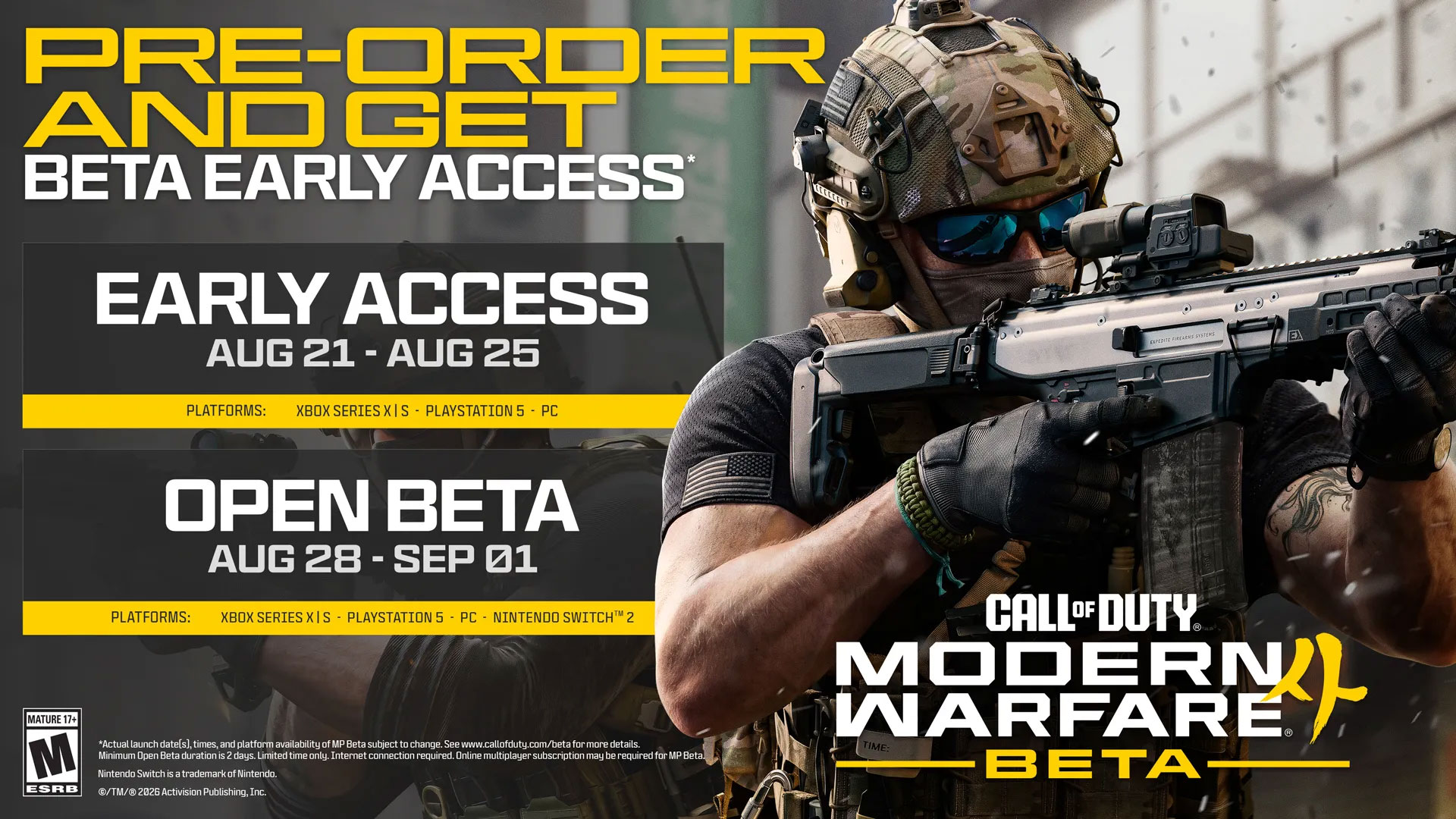
All physical edition preorders of Call of Duty®: Modern Warfare® 4 include a code to register for Early Access to the Modern Warfare 4 Open Beta 1. In most cases, the code will be printed on the retail receipt or sent to you via email on an online receipt. Please contact your retailer if you didn't receive or can't locate your code.

If you preordered a digital edition of Modern Warfare 4, you don't need a code. You're automatically registered to participate in the Modern Warfare 4 Open Beta with Early Access on your preorder platform.

1. How do I redeem my Early Access Beta token?

If you successfully redeemed a Beta code, you will be sent an Early Access Beta token to grant you access to the Beta. Early Access Beta tokens will be emailed from callofduty.com and will also be available on callofduty.com/betaredeem before Early Access begins.

Redeem your Early Access Beta token on the platform you chose when registering for the Beta.


Xbox

  1. From the Home screen, select and open the Store app.
  2. Press the View button on the controller to open the side menu.
  3. From that menu, select Redeem.
  4. Enter the Early Access Beta token and then follow the prompts.

Learn more about redeeming codes for Xbox.


PlayStation

  1. Go to Settings and select Users and Accounts.
  2. Under Account, select Payment and Subscriptions, then select Redeem Codes.
  3. Enter the Early Access Beta token and select Redeem.

Learn more about redeeming codes for PlayStation.

2. What do I do if I didn't get my Early Access Beta token email from Activision?

Early Access Beta tokens are emailed to the email address on the account you used to redeem your Beta code. After the email is sent, you can also find your Early Access Beta token on callofduty.com/betaredeem.

3. How do I download and launch the Beta?


The Call of Duty: Modern Warfare 4 Beta is downloaded separately through your platform's store.


Beta Preload Timing

  • Early Access players: preloading begins at 9:00 AM PT on Thursday, August 20
  • Open Beta players: preloading begins at 9:00 AM PT on Wednesday, August 26


Download and Launching the Beta


XBOX Series X|S and XBOX on PC

Download steps

  1. Search for Call of Duty: Modern Warfare 4 Beta in the XBOX Store.
  2. Select the Beta.
  3. Select Install.

XBOX on PC: A small portion of the Beta will be downloaded. The bulk of the download will be available to download on August 21 at 7AM PT.

Launching the game

Once the Beta is live, you can launch the Call of Duty: Modern Warfare 4 Beta through My games and apps.


PlayStation 5

Download steps

  1. Search for Call of Duty: Modern Warfare 4 Beta in the PlayStation Store.
  2. Select the Beta.
  3. Select Download.

Launching the game

Once the Beta is live, you can launch the game by selecting the Call of Duty: Modern Warfare 4 Beta on your PlayStation home screen or directly through your Game Library.


Battle.net

Download steps

  1. Go to the Call of Duty page within the Battle.net app.
  2. Select Call of Duty: MW4 Beta in the Game Version dropdown menu.
  3. Select Install.

Launching the game

  1. Navigate to the Call of Duty page from your Favorites or through the game menu.
  2. Select Call of Duty: MW4 Beta in the Game Version dropdown menu.
  3. Select Play.


Steam

Download steps

  1. Launch the Steam app and search for Call of Duty: Modern Warfare 4 in the Store.
  2. Open the Store page.
  3. Steam will automatically add the Beta to your Library and begin the download.

Launching the game

Once the Beta is live, you can launch the game by selecting the Call of Duty: Modern Warfare 4 Beta from your Steam Library.


Nintendo Switch 2

Download steps (starting at 9:00 AM PT on Wednesday, August 26)

  1. Search for Call of Duty: Modern Warfare 4 Beta in the Nintendo eShop on your Switch 2.
  2. Select the Beta.
  3. Select Download.

Launching the game

Once the Beta is live, you can launch the game by selecting the Call of Duty: Modern Warfare 4 Beta from the HOME menu.

Please note: A linked Nintendo Switch Online account is required to play Multiplayer game modes in the Beta.

4. I’m having trouble installing the Beta. What should I do?

Here are a few troubleshooting tips for installation issues:

  • Make sure that your console is up to date with the latest firmware.
  • Make sure your console is connected to the internet before starting the installation.
  • Keep your console connected to the internet throughout the entire installation.
  • Allow any installation to complete before attempting to access the Beta.
  • Make sure your console is set to your current region.
  • Make sure your console or PC has enough free storage space to install the game.
5. What can I do if I’m experiencing long download times?

You may experience slow downloads due to activity on your network, your region, or the speed of your internet connection.

To optimize your download speed, avoid other bandwidth-heavy applications while downloading the Beta. We also recommend using a wired connection. 


Actual platform availability, timing, and launch date(s) of MP Beta subject to change. See www.callofduty.com/beta for more details. Minimum Open Beta duration is 2 days. Limited time only, while Early Access Beta Codes last, at participating retailers. Internet connection required. Online multiplayer subscription may be required. PC Players: TPM 2.0 and Secure Boot are required to play online game modes. Learn more at https://support.activision.com/tpm.

  • XBOX players in Japan and PlayStation players in Germany will need to pay a nominal fee to access the Beta.
  • A linked Nintendo Switch Online account is required to play Multiplayer game modes in the Beta.


추가적인 지원이 필요하신가요?