ARTICLE HELPFUL?

YES NO

ARTICLE HELPFUL?

PLEASE SELECT A REASON WHY
255 character limit  / 255

THANKS FOR YOUR FEEDBACK

12/04/25

Activision Account Email Verification

Details about a proactive measure to help protect player accounts

Learn how to claim rewards in Call of Duty®: Black Ops 7 by verifying the email address on your Activision account.

As part of our continuous efforts to strengthen account security and combat cheating, a new account verification step has been added to new account linking, requiring some players to complete a security challenge via email to confirm account ownership.

Additionally, some players with existing Activision accounts will be asked to verify the email address associated with their account in order to log in or use it to play games that require an Activision account. 
Frequently Asked Questions

1. Why am I being asked to verify my email?

Email verification helps ensure that Activision account activities are legitimate and conducted by the rightful owner. Reusing passwords on other apps or websites in connection with your email can open the door to your account being stolen or hijacked.

Please check out Keeping your Activision Account Secure for tips to safeguard your Activision account from potential threats.

2. What if I didn’t receive the verification email?

Verification emails will always be sent when attempting to link an account or making changes to your personal information (excluding Full Name and home address). In some cases, email verification may also be required when logging in to an account online or in game. If these scenarios do not apply, you should not expect to receive a verification email.

If a verification email was sent but you didn’t receive it, please check your spam folder for an email from activision.com. If you still haven’t received the email after 24 hours, please try repeating your account change request or logging in to your account (online or in game) to trigger a new verification email. You may need to add activision.com to your approved sender list.

If you still don’t receive the verification email, please reach out to us for help.

3. I got an email verification request for a request I didn’t make. What should I do?

Linked account

If the notification states that an account that is not yours was linked to your Activision account, please take the following actions immediately:

  1. Log in to your Activision account.
  2. Find and unlink the account that was linked.
  3. Update your password.

Login attempt

If you received a notification identifying a login attempt you did not attempt, log in to your Activision account and update your password immediately.


Be sure to check out our tips for keeping your Activision account secure.

If you continue receiving email verification requests or identify other suspicious activity on your account, we recommend submitting a Hacked Account Recovery request.

4. What do I do if I don’t have access to the email associated with my Activision account?

Please reach out to your email account provider to request access to the email account.

If the account provider is unable to restore access to your email account, please reach out to us for help.

Please note: Due to privacy and security concerns, Activision Support may be unable to change account details.

5. Can I link my platform account online?

Yes. Visit Managing your Activision Account for steps to link a platform account. 

6. Why was I disconnected and required to change my password?

Additional account security measures have been implemented for accounts with passwords that may be at risk. For more information, please review Call of Duty Strengthening Account Security.

7. What can I do to better safeguard my account?

Please check out Keeping your Activision Account Secure for tips to safeguard your Activision account from potential threats.

We also recommend reviewing the Call of Duty Security and Enforcement Policy for details about activities that may impact your account’s standing.


Call of Duty: Black Ops 7 Email Verification Incentive

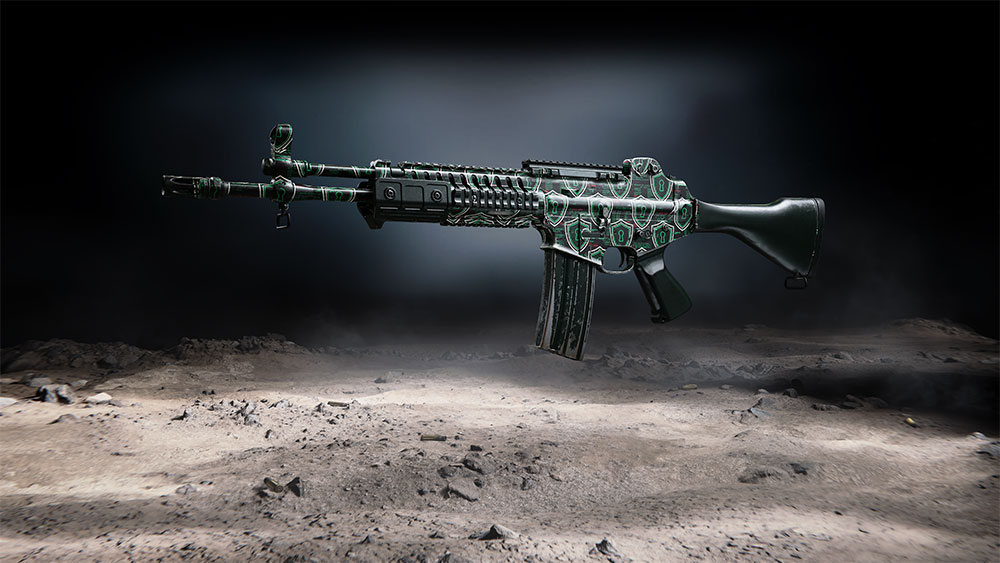
Whether you’ve never verified the email address on your Activision account or you've previously done so, you can claim rewards for use in Call of Duty: Black Ops 7 and Call of Duty: Warzone. The rewards package includes:

  • The Veiled Aurora Weapon Camo, which can be used on Call of Duty: Black Ops 7 weapons only across Black Ops 7 and Call of Duty: Warzone modes
  • Five hours of Double Level XP (2XP)
  • Five hours of Double Weapon XP (2WXP)
  • Five hours of Double Battle Pass XP
Veiled Aurora Weapon Camo
1. How do I claim rewards for verifying my email?

Whether you’ve previously verified your email or are verifying for the first time, follow these steps to claim your rewards.

  1. Head over to callofduty.com/verify-email.
  2. Log in to your Activision account.
    • Important! After logging in, you will see the email address associated with your Activision account. Make sure you have access to this email account before proceeding. If you don’t have access to this email, see Question 4 above.
  3. Select Send Verification Email.
  4. Check your inbox for a verification email and select the link provided to verify your account.
    • Please note: If you don’t see the verification email in your inbox, check your spam folder. If you still don’t see the email, return to callofduty.com/verify-email and select Resend Link.

After verifying your email address, your rewards will be available in Call of Duty: Black Ops 7 and Call of Duty: Warzone the next time you log in to the game.

Please note: If the game is running when you verify, you will need to restart the game to receive your rewards.

2. What should I do if I successfully verified my email address but didn’t receive my rewards?

If the game is running when you verify, you will need to restart the game to receive your rewards.

If your rewards still haven’t been delivered in game after a restart, please reach out to us for help.

Looking For More Help?