這文章有用嗎?

是 否

這文章有用嗎?

請選擇原因
意見回饋的字元上限為255。  / 255

感謝你的意見

10/16/26

Activision帳號電子郵件驗證

協助保護玩家帳號的預應性措施相關細節

Learn how to claim the Locked Down Weapon Camo in Call of Duty®: Modern Warfare 4 by verifying the email address on your Activision account.

為了持續強化帳號安全性並與作弊行為戰鬥,我們新增了帳號驗證步驟,玩家必須透過電子郵件完成安全挑戰,以在連結帳號或變更憑證時確認帳號所有權。

為了進一步提升安全性,所有透過動視帳號驗證電子郵件的玩家,都會自動啟用電子郵件雙步驟驗證。進一步了解電子郵件雙步驟驗證。

此外,部分現有的Activision帳號玩家可能會被要求驗證與其帳號綁定的電子郵件地址,才能登入或使用該帳號玩需要Activision帳號的遊戲。

常見問題解答

1. 為什麼我被要求驗證電子郵件?

電子郵件驗證能幫助確保Activision帳號的活動是為合法,並由正確的擁有者進行操作。在其他應用程式或網站重複使用與你的電子郵件相同的密碼,可能會讓你的帳號被竊取或劫持。

請查看保護你的Activision帳號以進一步了解如何保護你的帳號免於潛在威脅。

2. 我沒有收到驗證信怎麼辦?

當玩家試圖連結帳戶或變更個人資訊時(不包括全名和住家地址),系統會發送電子郵件驗證信。在某些情況下,玩家在登入帳戶或在遊戲內時,也會被要求進行電子郵件驗證。如果非前述情況,你不會收到電子郵件驗證信。

如果沒有收到電子郵件驗證信,請檢查你的垃圾郵件收件匣中是否有來自activision.com的郵件。如果你在24小時後仍未收到驗證信,請再次嘗試要求變更帳號或登入你的帳號(線上或遊戲內)以觸發系統發送新的驗證信。你可能需要將activision.com添加至核准的寄件者清單中。

如果你仍然沒有收到驗證信,請聯絡我們尋求協助。

3. 我收到了一個我未提出的電子郵件驗證請求。我該怎麼做?

已連結帳號

如果通知顯示有不是屬於你的帳號已連結到你的Activision帳號,請立即採取以下行動:

  1. 登入你的Activision帳號。
  2. 找到並將該帳號解除連結。
  3. 更新你的密碼。

登入嘗試

如果你收到並非不是你的登入通知訊息,請立即登入你的Activision帳號並更新密碼。


請務必查看我們針對保護你的Activision帳號所建議的方法.。

如果你持續收到電子郵件驗證請求或發現帳號有其他可疑活動,我們建議提交帳號被盜復原申請。

4. 如果我無法使用與Activision帳號相關聯的電子郵件,我該怎麼辦?

請聯絡你的電子郵件帳戶提供者以請求存取該電子郵件帳戶。

如果帳戶提供者無法恢復對你的電子郵件帳戶的存取權,請聯絡我們以獲得協助。

請注意:基於隱私權與安全考量,Activision Support可能無法更改帳號細節資訊。

5. 我可以在線上連結我的平台帳號嗎?

請造訪管理你的Activision帳號,以了解連結平台帳號的步驟。

6. 為什麼我被斷線並且被要求更換我的密碼?

已為使用可能存在風險的密碼之帳號實施額外安全措施。如果要了解更多資訊,請參閱 決勝時刻 強化帳戶安全性。

7. 我該怎麼加強保護我的帳號?

請查看保護你的Activision帳號以進一步了解如何保護你的帳號免於潛在威脅。

我們也建議詳閱決勝時刻安全與執行政策,以了解什麼可能會對你的帳號狀態造成影響。


Call of Duty: Modern Warfare 4 Email Verification Incentive

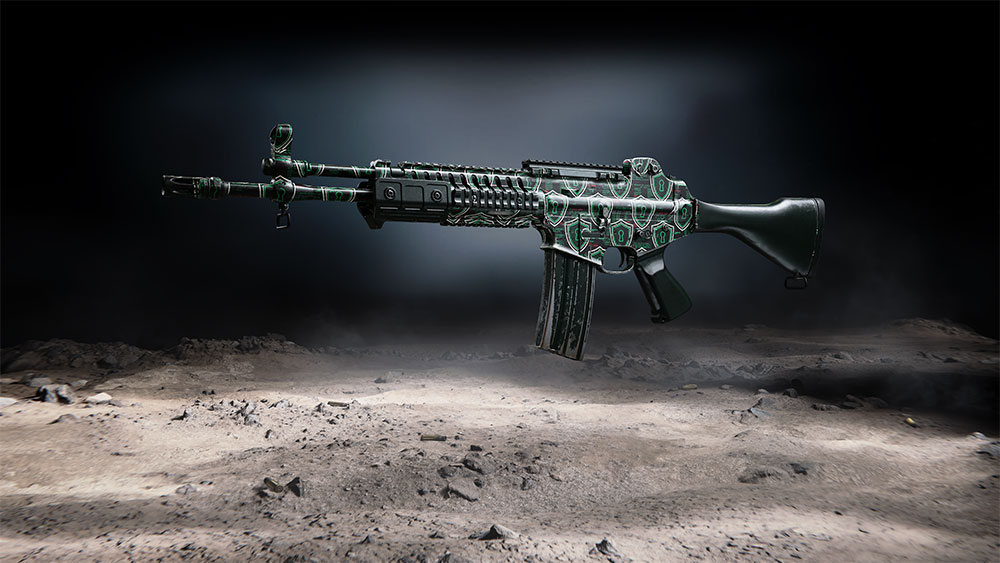
By verifying the email address on your Activision account, you can claim the Locked Down Weapon Camo for use in Call of Duty: Modern Warfare 4 and Call of Duty: Warzone. The Locked Down Weapon Camo can be used on Modern Warfare 4 weapons only across Modern Warfare 4 and Warzone modes.

Locked Down Weapon Camo
1. How do I claim my reward for verifying my email?

Follow these steps to verify your email and claim your reward.

Please note: If you’ve previously verified your email, you do not need to verify again. Your reward will be automatically granted by Season 1. 

  1. Head over to callofduty.com/verify-email.
  2. Log in to your Activision account.
    • Important! After logging in, you will see the email address associated with your Activision account. Make sure you have access to this email account before proceeding. If you don’t have access to this email, see Question 4 above.
  3. Select Send Verification Email.
  4. Check your inbox for a verification email and select the link provided to verify your account.
    • Please note: If you don’t see the verification email in your inbox, check your spam folder. If you still don’t see the email, return to callofduty.com/verify-email and select Resend Link.

After verifying your email address, your reward will be available in Call of Duty: Modern Warfare 4 and Call of Duty: Warzone the next time you log in to the game.

Please note: If the game is running when you verify, you will need to restart the game to receive your reward.

2. What should I do if I successfully verified my email address but didn’t receive my reward?

If the game is running when you verify, you will need to restart the game to receive your reward.

If your reward still hasn’t been delivered in game after a restart, please reach out to us for help.

要尋求更多協助嗎?